As an Amazon Associate, we earn from qualifying purchases. Some links on this site are affiliate links at no extra cost to you. Our recommendations are based on thorough research and editorial judgment.


Monitor Light Bars: When They Help and How to Aim

Monitor light bars are beneficial for enhancing workspace productivity, especially for those spending long hours at screens. They provide focused illumination while minimizing glare. To aim them effectively, we should center the light bar on top of the monitor and tilt it downwards towards the desk. Adjusting the brightness and color settings further enhances comfort and reduces eye strain. For more details on using these lighting solutions effectively, we’ll explore additional tips and insights.
Key Takeaways
- Monitor light bars enhance productivity by providing focused illumination that reduces eye strain during long screen time sessions.
- They help improve workspace ergonomics by complementing monitor setups and promoting better posture through optimized lighting.
- Proper positioning involves centering the light bar on the monitor and angling it downward to illuminate the desk without glare.
- Adjust brightness and color temperature to match the task: warmer tones for relaxation and cooler tones for enhanced focus.
- Utilize features like auto-dimming and remote controls for easy adjustments, ensuring your lighting adapts to changing ambient conditions.
Understanding Monitor Light Bars
When we think about our workspace, proper lighting often gets overlooked. One solution to improve our lighting setup is using monitor light bars. These innovative LED fixtures attach directly to our computer monitors, offering focused illumination without glare. They help minimize eye strain, making them ideal for those of us working long hours at screens.
Key features include:
- Adjustable Brightness and Color: We can tailor the light output to match our environment and preferences.
- Efficient Design: They direct light onto the desk while keeping the monitor glare-free.
- Easy Setup: Installation is simple, with most models needing just a USB connection.
With options for remote control, customizing our workspace lighting has never been easier. Many users pair monitor light bars with desk organization solutions like clear acrylic organizers to keep both lighting and workspace clutter under control.
Benefits of Using Monitor Light Bars

Monitor light bars offer a range of benefits that can greatly enhance our workspace experience. Here’s what we can gain:
- Reduced Eye Strain: These monitor lights provide focused illumination that minimizes glare, helping us work longer without discomfort.
- Customizable Lighting: We can adjust brightness and color temperature to match our preferences and the time of day, boosting productivity.
- Space-Saving Design: By attaching directly to our monitors, these light bars save valuable desk space, eliminating the clutter of traditional lamps.
- Targeted Illumination: Their asymmetrical optical design directs light onto our desks while preventing distracting reflections on the screen.
- Convenience Features: Options like auto-dimming and remote controls add an extra layer of comfort, enhancing our overall experience during work.
- Many models also incorporate non-slip surfaces and durable materials to ensure stable placement and long-lasting use.
Recommended Products

WORLD'S 1ST DUAL UHD MONITOR: 57" DUHD resolution brings you a display as wide as 2 UHD monitors with incredibly detailed, pin-sharp images and a wide field of view; See more of the action and play with conviction, knowing you won't miss a thing

10 Points Touch Screen Monitor: the screen can be touched everywhere, use multiple fingers to zoom in and out of images no driver required, just like a tablet or touchscreen laptop, also can work with glove and adjust the brightness

10 Points Touch Screen Monitor: the screen can be touched everywhere, use multiple fingers to zoom in and out of images no driver required, just like a tablet or touchscreen laptop, also can work with glove and adjust the brightness
How Monitor Light Bars Enhance Workspace Ergonomics

In our pursuit of a comfortable and efficient workspace, it’s essential to take into account how effective lighting impacts our overall ergonomics. Monitor light bars play a significant role in this aspect by reducing eye strain and enhancing our ergonomic workspace.
- Asymmetrical Design: They direct light to our desks without creating glare on screens, promoting visual comfort.
- Space-Saving: By mounting directly on monitors, they help us maintain an organized setup.
- Customizable Lighting: Adjustable brightness and color temperatures let us tailor the lighting to our needs, helping to reduce fatigue.
- Workflow Efficiency: A well-lit workspace supports focused tasks while minimizing distractions from darkness.
Incorporating monitor light bars into our workspaces not only improves lighting but also encourages better posture and comfort. Many monitor accessories, including light bars, are designed to complement ergonomic setups and two-tier storage options to keep desks clutter-free.
Recommended Products

Heritage & Innovation: The FUJIFILM X-T50 brings the flagship DNA of FUJIFILM X-Series cameras into a compact, travel-friendly design. Ideal for photographers seeking advanced features and portability. Equipped with 40.2 MP- Megapixel X-Trans CMOS 5 HR sensor & X-Processor 5, the X-T50 delivers outstanding photo & video quality, capturing intricate details and vibrant colors. A remodeled hand grip with a more curved design provides improved handling and comfort, ensuring precision in every sho
WORLD'S 1ST DUAL UHD MONITOR: 57" DUHD resolution brings you a display as wide as 2 UHD monitors with incredibly detailed, pin-sharp images and a wide field of view; See more of the action and play with conviction, knowing you won't miss a thing

Premium Cushion: Designed to weather the elements, Sunbrella's fabric is woven with 100% solution-dyed acrylic that is stain-resistant, colorfast, and UV-resistant. Sunbrella products include a five-year limited warranty.
Positioning Your Monitor Light Bar for Optimal Performance

Achieving ideal performance from our monitor light bar requires careful positioning, as the right setup can greatly enhance our workspace experience. Here’s how we can optimize our placement:
- Center the Light Bar: Position it at the top of the monitor for even illumination across the desk, minimizing shadows.
- Tilt Downwards: Adjust the head downwards to focus light on the work surface, reducing the chances of glare from the LEDs.
- Use Counterweight: Secure the light bar with its back counterweight for stability during adjustments.
- Regular Checks: Frequently assess the angle and position to maintain effectiveness in reducing eye strain.
- Consider portability and setup needs when choosing accessories, since many lighting and backdrop products emphasize easy setup and quick assembly.
Recommended Products

【Easy Setup & Outdoor Cooking】: This outdoor kitchen island grill station arrives nearly fully assembled; 6 stainless steel burners, 1 rear ceramic infrared burner deliver up to 85,000 BTU for grilling, warming and pan cooking; upper warming rack helps keep cooked food ready to serve

Flexible Storage: Combining refrigerated and frozen storage in one footprint, Coolake refrigerator features a 1/5 HP R290 powered refrigerator that maintains temperatures from 33°F to 41°F and a 1/3 HP freezer that maintains temperatures from -13°F to -5°F, maximizing space efficiency while accommodating a wide variety of chilled and frozen ingredients

Lift up /tilt up screen. Imagine having a cocktail table and a standup in one , this Cocktail table screen lifts up.Commercial Grade Arcade Machine. Highest Quality 26.5 LCD Monitor, Thick Tempered Glass. 4600 Games , Please send message for full game list
Adjusting Brightness and Color Temperature
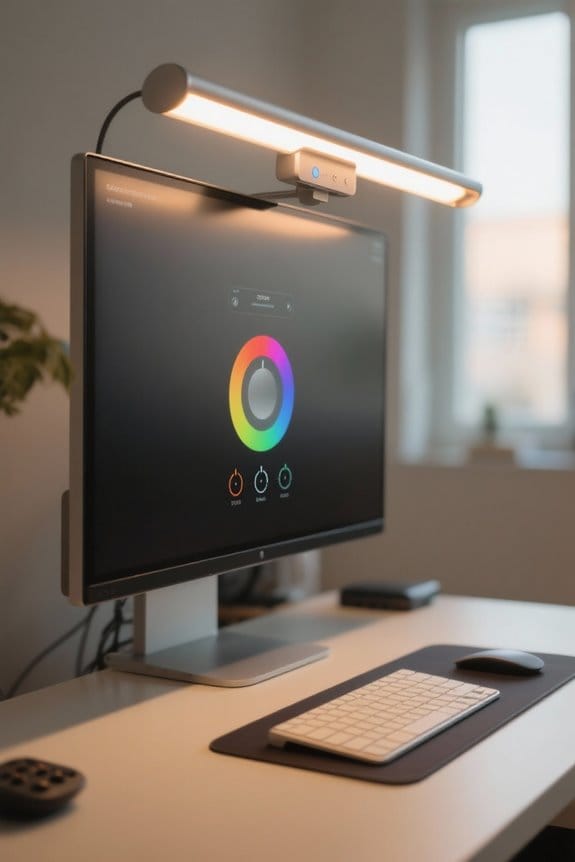
After ensuring our monitor light bar is positioned for ideal performance, we can enhance our workspace further by fine-tuning the brightness and color temperature.
- Adjusting Brightness: We can simply twist the knob clockwise for more light, ensuring we have excellent visibility for our tasks. This customization helps reduce eye strain, especially during long periods of screen use.
- Modifying Color Temperature: By pressing the knob, we can switch between warm (2900K) and cool light (6000K). Warmer tones improve relaxation for evening tasks, while cooler tones enhance focus and alertness during the day.
Additionally, a wireless remote (sold separately) offers convenient adjustments, letting us control both brightness and color temperature from a distance for added flexibility.
Choosing a lamp with a high weight capacity and sturdy build ensures durability and reliable performance over time.
Monitor Light Bars vs. Traditional Desk Lamps
Monitor light bars offer unique advantages over traditional desk lamps that make them particularly appealing for computer users.
- Space-Saving Design: Monitor light bars attach directly to the top of your monitor, freeing up valuable desk space.
- Glare Reduction: Unlike desk lamps that can cast shadows and cause screen glare, these light bars feature asymmetrical designs that deliver focused illumination without reflections.
- Targeted Lighting: They provide precise lighting aimed at your keyboard and workspace, enhancing visibility without the wide coverage and shadows of traditional lamps.
- Customizability: The adjustable brightness and color temperature options cater to our ergonomic needs, helping to reduce eye strain and creating ideal ambient lighting for extended computer use.
They also often incorporate ergonomic designs similar to modern peripherals, improving comfort and usability.
Recommended Products
Please note: Kamvas Pro 16 Plus 4K Pen Display is not a standalone product; this device must be connected to a computer/laptop/android phone to work.

GO Ultra Pogačar Edition – Co-designed with Pogačar & UAE Team Emirates XRG to celebrate his Tour de France legacy. Features iconic Tour Yellow accents, signature Pogi details, custom shutdown animation, and exclusive Pogi Dashboard with ride stats.

Panoramic Display with Elegant Curved Glass: This refrigerated display case is crafted with four double-layer tempered glass sides and a curved front glass panel, offering a clear, 360° view of cakes, beverages, sandwiches, and other items. Its sleek, curved front adds a premium look, making it a sophisticated fit for any countertop in cafes, bakeries, or convenience stores
Ideal Users for Monitor Light Bars
Who can benefit from using monitor light bars?
- Office Workers: They spend long hours in front of screens, often facing eye strain. Monitor light bars reduce fatigue by providing appropriate ambient light.
- Designers and Artists: For us, correct color representation is vital. Light bars enhance our ability to work on detailed projects without misconstruing colors.
- Gamers: We appreciate the customizable RGB lighting effects that some models offer, which create an immersive gaming atmosphere.
- Reading and Writing Enthusiasts: We find that monitor light bars create ideal lighting conditions, helping us stay comfortable and productive during long sessions.
- Remote Workers: Those of us working in low-light environments can improve visibility and minimize glare, making monitor light bars essential in our desk setups.
USB-powered lights are energy-efficient and often offer multiple colors and modes, making them a practical choice for many users and enabling energy savings in daily use.
Tips for Maximizing Your Monitor Light Bar Experience
Enhancing your workspace experience can be as simple as optimizing how you use your monitor light bar. Here are some practical tips:
- Positioning: Place the light bar centrally on your monitor for even illumination and reduced glare on your screen.
- Angle Adjustment: Angle the light bar downward to target your desk area, preventing light from hitting your monitor directly.
- Brightness & Warmth: Adjust brightness and color temperature according to the task at hand; warmer tones can create a relaxed atmosphere, while cooler tones promote focus.
- Experiment Daily: Test different settings throughout the day to match ambient light, which can effectively reduce eye strain.
Lastly, consider a wireless remote for effortless adjustments without needing to reach for the monitor. Many modern light bars also include adjustable color temperatures to help match ambient lighting and reduce eye fatigue.
Recommended Products

Large Ice Production: This commercial ice maker can produce 1000 lbs of ice per 24 hours, with a 500 lbs large capacity and excellent insulation, ensuring a continuous supply of ice

Intelligent APP Control: This commercial cooler features a built-in wireless function, enabling remote supervision of refrigeration equipment and food preservation from computers, tablets, mobile phones. Easily manage auto defrost, adjust temperature, and get alerts (unit failure, open doors, temperature change) via text/email notifications, and avoid increased maintenance costs caused by the expansion of faults

【Jasion Electric Bike 1800W Peak Power & 80+ Mile Range】Command the road with a 1800W peak motor delivering 85N·m of instant torque for effortless hill climbing and acceleration. The high-capacity 48V 18Ah battery supports speeds over 30 mph and a remarkable range of up to 80 miles per charge, making this Jasion electric bike for adults your ultimate long-range explorer and powerful daily commuter.
Frequently Asked Questions
How to Aim Light Bars?
To aim light bars effectively, we should consider light quality and adjust angles based on user preferences. Balancing energy efficiency with comfortable illumination helps create an ideal workspace, enhancing our productivity and reducing eye strain.
What’s the Point of Monitor Light Bars?
What’s the point of monitor light bars? They offer illumination benefits, reduce eye strain, and enhance workspace aesthetics. By improving our work environment, we can stay focused and productive during those long screen hours.
How to Position a Monitor Light Bar?
To position a monitor light bar effectively, we should center it on the monitor’s top edge, tilt it downward for ideal lighting effectiveness, and follow desk organization tips for a clutter-free workspace.
How to Angle a Monitor Light?
Did you know that 90% of people experience digital eye strain? To angle the monitor light, tilt it downward for glare reduction, ensuring ideal brightness on our workspace while keeping the LED lights out of sight.


