As an Amazon Associate, we earn from qualifying purchases. Some links on this site are affiliate links at no extra cost to you. Our recommendations are based on thorough research and editorial judgment.


True Tone Vs Night Shift Vs HDR: When Each Helps Your Eyes

True Tone, Night Shift, and HDR enhance our eye comfort in different ways. True Tone adjusts screen color based on ambient light, offering a natural viewing experience. Night Shift reduces blue light exposure in the evening, promoting better sleep. HDR provides vibrant colors and improved contrast, ideal for watching media. These features can be used together for the best comfort based on our needs. If we stay informed, we can better understand how to maximize our visual experience.
Key Takeaways
- True Tone adapts the screen color temperature based on ambient light, minimizing eye strain in varying environments.
- Night Shift reduces blue light exposure during evening hours, promoting better sleep quality and reducing visual fatigue.
- HDR enhances color accuracy and contrast, providing a more vibrant viewing experience for media while reducing eye strain.
- Use True Tone in diverse lighting conditions for a natural viewing experience and comfort during prolonged screen time.
- Activate Night Shift at sunset for optimal eye protection before bed, while HDR is ideal for watching high-quality media during the day.
Understanding True Tone
You may be interested


When we consider how our devices display colors, True Tone technology offers a significant upgrade. By automatically adjusting the screen’s color temperature based on the surrounding ambient light, it provides a more natural viewing experience.
Key Features of True Tone:
- Utilizes two ambient light sensors, located on the front and back, to make real-time adjustments.
- Minimizes harsh blue light exposure in poorly lit settings to help reduce eye strain.
- First introduced on the 9.7-inch iPad Pro in 2016, now available in iPhones from the iPhone 8 onward.
Users can toggle True Tone easily via Settings under Display & Brightness or from the Control Center. This feature makes a noticeable difference in how we perceive colors across various display technologies. Additionally, devices with True Tone often pair well with high-capacity batteries to maintain consistent display behavior during extended use.
The Functionality of Night Shift

The functionality of Night Shift revolves around reducing the harmful effects of blue light emitted by our devices. This feature, introduced in iOS 9.3, is essential for minimizing eye strain and enhancing sleep quality.
- How It Works: Night Shift automatically shifts the color temperature of your display to warmer tones as sunset approaches.
- Customization: Users can schedule activation or manually adjust warmth using a slider, ensuring a comfortable viewing experience.
- Accessibility: It’s available on iPhone 5s and later models, making it widely accessible.
Many users pair Night Shift with eco-friendly screen cleaners and good cleaning habits to keep displays clear and comfortable to view.
Recommended Products
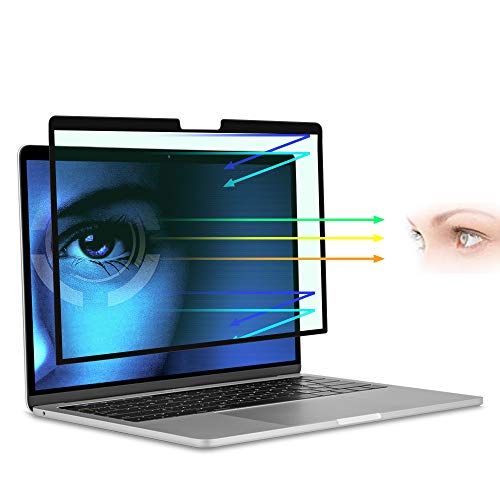
[69.7% Blue Light Blocking Filter]: for Macbook pro 13 inch M2 (2022-2016) 69.7% blue light blocking filter blocks the harmful blue light between 380nm~490nm from the wave range of visible lights, blue light reaches the retina with strong energy. This filter reduces digital eye strain when viewing screens and gives you a better sleeping.

【Measurement】-Lens Width 49mm | Bridge 18mm | Temple Length 146mm | Frame Width 138mm | Lens Height 35mm.This small-frame design fits samll to medium faces. We suggest larger face shapes choose a different model
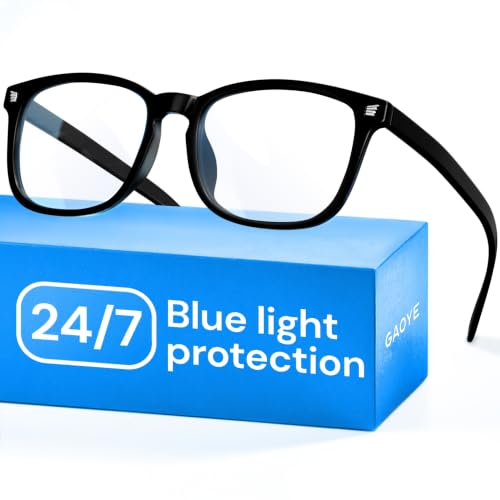
BLUE LIGHT BLOCKING: Our blue light glasses for men and women boast UV400 protection, blocking harmful blue rays from electronic screens.
The Role of HDR in Visual Comfort

Visual comfort plays an essential role in our daily interactions with screens, and HDR (High Dynamic Range) technology greatly enhances that experience. Here’s how HDR contributes to our visual comfort:
- Broader Color Spectrum: HDR delivers a wider range of colors, making images appear more vibrant and lifelike.
- Reduced Eye Strain: By allowing deeper blacks and brighter whites, HDR minimizes harsh contrasts that can lead to discomfort.
- Optimized Brightness: HDR adjusts brightness and color temperature, helping us distinguish between light and dark elements effortlessly.
- Improved Viewing Experience: Studies show HDR supports better detail recognition during extended viewing, enhancing engagement.
Incorporating HDR into our screen time can drastically reduce eye strain, making our viewing experience more enjoyable and comfortable. Many HDR-enabled displays also pair well with high-quality webcams that offer automatic light correction, improving overall on-screen appearance.
Recommended Products

Samsung’s 27” Odyssey G5 QHD Gaming Monitor delivers brilliant visuals and unparalleled lightning-fast action.

34 inch Curved 1500R UWQHD(3440 x 1440) @ 200Hz Fast VA Ultrawide Gaming Monitor with AI built-in.

⭐27 inch curved monitor with speakers built in for gaming, work or business.
Benefits of True Tone for Eye Health

After understanding how HDR enhances visual comfort, it’s important to explore how True Tone technology further supports eye health.
- Dynamic Adjustments: True Tone uses ambient light sensors to adjust the screen’s color temperature. This minimizes eye strain by adapting to surrounding lighting conditions.
- Reduced Blue Light: In dim environments, True Tone warms the display, reducing harsh blue light exposure. This creates a comfortable viewing experience, ultimately benefiting our eyes.
- Enhanced Accuracy: For photographers and designers, True Tone provides more accurate natural colors, making it easier to work under different lighting.
- Less Visual Fatigue: Users often report that activating True Tone helps reduce visual fatigue, making long screen sessions easier on the eyes and promoting better overall eye health.
True Tone often pairs well with other screen-care features like anti-static properties to maintain device cleanliness and reduce distractions.
How Night Shift Reduces Blue Light

Many of us spend significant time on our screens, especially in the evening, which can strain our eyes. Night Shift reduces the blue light emitted from our devices by adjusting the display to a warmer tone. This change helps reduce the amount of blue light we’re exposed to, which can alleviate eye strain during nighttime use.
Understanding the temperature of the display is essential, as a warmer tone promotes better sleep quality by supporting our natural circadian rhythms. Users can also customize the color temperature settings to find what feels most comfortable for their eyes. By limiting blue light exposure, Night Shift not only reduces eye discomfort but also encourages a smoother shift to sleep, making it a valuable tool for our nightly routines. Many users supplement Night Shift with physical anti-blue light screen protectors to further reduce harmful blue and UV light exposure.
Recommended Products

Applicable model: Compatible with iPhone 13/13 Pro/14/16e/17e(6.1Inch).Please check the model of your iPhone in “Settings”-General-About- Model Name, Choose the right screen protector according the model name of your iPhone

Dimension: 21.26 x 13.39 inch/L x W. Compatible with iMac 24 inch;compatible with Lenovo Ideacentre 23.8;compatible with HP Pavilion 24/Flagship 23.8;compatible with Inspiron 23.8,compatible with Dell P Series 24;compatible with Fast Elite 8300 FHD 23;compatible with Sceptre 24;compatible with Acer Aspire 23.8/XFA240 bmjdpr 24;compatible with ViewSonic 24 and diagonally measured 23,23.6,23.8,24 inch 16:9 widescreen desktop PC LED monitor. Please measure your modiagonal dimension before purchase

【BEFORE ORDERING】1. Measure monitor diagonal size without edges. 2. Please check the size chart to confirm the correct variation you need.3. The width and height of computer blue light blocking screen protector 23-24 inch (23 inch, 23.5 inch, 23.6 inch, 23.8 inch, 24 inch) is width 540 mm * height 340 mm. (COMPATIBLE FOR IMAC 24 inch screen and Curved Monitors)
Comparing the Effects of True Tone, Night Shift, and HDR
When we’re comparing True Tone, Night Shift, and HDR, it’s important to understand how each feature addresses our viewing needs.
- True Tone adjusts screen color temperature based on ambient light. It helps create a natural viewing experience, reducing eye strain in various environments.
- Night Shift reduces blue light by shifting to warmer tones. This feature is especially beneficial for evening use, enhancing our sleep quality by decreasing blue light exposure.
- HDR (High Dynamic Range) improves image contrast and color accuracy. It reveals details in bright and dark scenes, making it great for media consumption without increasing eye strain.
Many users also benefit from accessories like adjustable kickstands that enable comfortable viewing angles and reduce strain during extended use.
Recommended Products

【High-quality Material】The phone stands are made of aluminum alloy making the Stander durable, and the unique design gives the kickstand a sturdy supporting force. With the stand in your phone, whatever flat or stand up your phone will not collapse. Also, you can adjust the degree of the stand to an angle you feel comfortable. You won't be disappointed with this reliable and stable kickstand.

Ringke Outstanding attachable stand for use with a case (*Case NOT included)
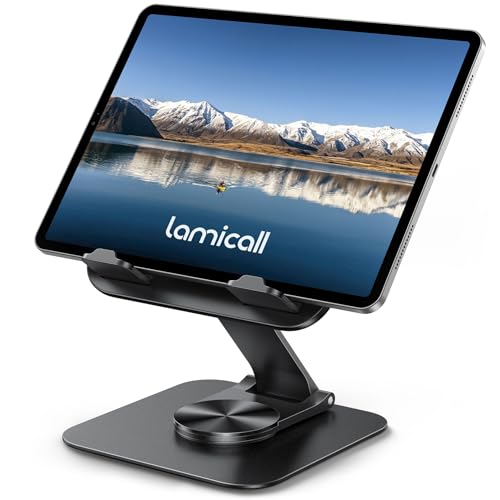
Ultra-Slim Foldable: Lamicall iPad stand for desk folds flat to just 0.59" thick, making it easy to slip into your backpack, laptop bag, or carry-on. Lightweight yet durable, it’s a perfect addition to your travel accessories.
Tips for Optimizing Eye Comfort With These Features
To maximize eye comfort with features like True Tone, Night Shift, and HDR, we can adopt a few practical strategies.
True Tone: Use this during the day to adjust the display’s color temperature according to ambient light, helping to reduce eye strain.
Night Shift: Activate this in the evenings to shift screen colors to warmer tones. This helps minimize blue light exposure, improving sleep quality.
Combining Features: For ideal comfort, use both True Tone and Night Shift together. This adapts your display to current lighting and time of day.
HDR: While engaging in movies or games, turn on HDR for vibrant colors and enhanced contrast, making the experience enjoyable without straining our eyes.
Additionally, consider devices with long battery life like those offering 2600mAh battery capacities to avoid frequent brightness-driven charging that can worsen eye fatigue.
Recommended Products

【BEFORE ORDERING】1. Measure monitor diagonal size without edges. 2. Please check the size chart to confirm the correct variation you need.3. The width and height of ZYY computer blue light blocking screen protector 23-24 inch (23 inch, 23.5 inch, 23.6 inch, 23.8 inch, 24 inch) is width 540 mm * height 340 mm. (COMPATIBLE FOR IMAC 24 inch screen and Curved Monitors)

Compatible for iPhone 16 Pro Max with case-friendly design

Advanced Anti-Blue Light Technology: Our cutting-edge, our iPhone 17 Pro Max screen protector blue light is expertly designed to filter out harmful blue light (400nm to 470nm band). Meanwhile, it preserves the essential, harmless blue light wavelengths, ensuring your display's true colors remain vibrant and undistorted. Uyiton screen protector not only defends your vision but also provides a robust shield for your device's screen
Frequently Asked Questions
Which Is Better for Eyes, True Tone or Night Shift?
We believe both True Tone and Night Shift are great for our eyes. True Tone adjusts screen brightness and color temperature, reducing eye strain, while Night Shift minimizes blue light, enhancing visual comfort during digital reading, especially evenings.
Is Night Shift Mode Better for Eyes?
Night Shift mode’s definitely better for our eyes! It fights blue light like a superhero, cuts down eye strain, and boosts our sleep quality. Plus, we can tweak the color temperature for ultimate visual comfort.
Is True Tone Good for Your Eyes?
Yes, True Tone’s benefits enhance visual comfort and color accuracy, helping us reduce light sensitivity and eye fatigue. By adjusting screen brightness to match surroundings, it creates a more pleasant viewing experience.
Which Iphone Setting Is Best for Eyes?
We’ve found adjusting our iPhone’s display settings is like finding the right pair of glasses. Using Night Shift reduces blue light, while True Tone optimizes screen brightness and color temperature, enhancing visual comfort and minimizing eye strain.


