As an Amazon Associate, we earn from qualifying purchases. Some links on this site are affiliate links at no extra cost to you. Our recommendations are based on thorough research and editorial judgment.


Clamshell Mode Myths: Heat, Wear, Best Practices

Clamshell mode often raises concerns about heat and wear, but we shouldn’t be too worried. Here’s what we found:
- Thermal sensors effectively manage heat, preventing excessive buildup.
- Increased fan activity usually doesn’t impact performance.
- To keep things cool, use a stand for better airflow and monitor temperatures with apps like iStat Menus.
- Remember that prolonged clamshell use can generate more heat, so staying mindful is key.
Let’s explore best practices and common myths to better understand this feature.
Key Takeaways
- Clamshell mode doesn’t cause excessive heat; thermal sensors effectively manage temperature during use.
- Minimal wear occurs from long-term clamshell mode usage for most users due to efficient cooling mechanisms.
- Adequate ventilation is crucial; use a laptop stand and avoid soft surfaces to prevent heat buildup.
- Monitoring internal temperatures with software can help maintain optimal performance and device lifespan.
- Increased fan activity indicates cooling; it typically does not affect performance for users in clamshell mode.
Understanding Clamshell Mode and Thermal Concerns
When we use our MacBooks in clamshell mode, it’s essential to understand how this can impact thermal performance. Operating with the lid closed and connected to an external display can lead to thermal concerns due to restricted airflow, potentially causing overheating issues.
Here are some key points to take into account:
- Ventilation: Verify there’s adequate space around the laptop for airflow.
- Performance Throttling: The thermal sensors detect elevated temperatures and throttle performance to prevent overheating. However, this might increase fan activity during intensive tasks.
- User Experiences: While many users successfully use clamshell mode without overheating, prolonged heavy usage necessitates careful monitoring of heat levels.
Keeping these aspects in mind can help us maintain our MacBooks effectively in clamshell mode. Consider using external cooling solutions like laptop cooling pads to reduce temperatures and improve airflow.
Recommended Products

8th Generation Intel Core i5-8520U 1.6GHz (Turbo up to 3.4GHz) quad-core processor

Smart Cooling - Intelligently adjusts fan speeds based on system temperatures: From idle to full load, keep your laptop running smoothly with our first laptop cooling pad that changes fan speeds automatically to manage system temperatures based on your settings.

【Precision Fit+Model Coverage】This ipad case with keyboard is specifically designed ONLY for iPad Air 13" (M4 2026/M3 2025/M2 2024) & iPad Pro 12.9" (6th/5th/4th/3rd Gen). Models:A3464; A3268, A3269, A3271; A2898, A2899, A2900; A2436, A2764, A2437, A2766; A2378,A2461,A2379,A2462; A2229,A2069, A2232, A2233; A1876,A2014, A1895, A1983 . Please verify the "Axxxx" code on the back.
User Experiences: Clamshell Mode and Heat Generation

Using our MacBooks in clamshell mode can lead to varying experiences regarding heat generation. Many users, including us, have found that operating a MacBook Air in clamshell mode results in minimal overheating, even during demanding tasks.
- Heat Management: The built-in thermal sensors effectively throttle CPU and GPU performance when needed.
- User Reports: While some experience fan activity increase, it doesn’t typically affect performance or lead to shutdowns.
- Long-Term Use: Most users haven’t noticed significant wear or issues after extensive clamshell mode usage.
For those of us working from home, it’s vital to guarantee proper ventilation. Keeping an eye on temperatures can help maintain the MacBook’s efficiency and longevity while enjoying the advantages of clamshell mode. Industrial designs that maximize heat dissipation are key for maintaining laptop performance during intensive tasks and often use multiple fans to improve airflow.
Recommended Products

【Blazing-Fast 6000MB/s Transfers】Imagine this: You've just pressed start on your coffee machine. By the time the first drip hits the cup, a 100GB 8K video project has already transferred from your drive to your laptop. That's the real-world power of FIDECO's 80Gbps speed – up to 6000MB/s read/write. Whether you're backing up RAW photos, moving AAA game files, or editing high-res footage directly from the drive, you'll spend less time waiting and more time creating.
SMART COOLING — From idle to full load, keep the laptop running smoothly with our first laptop cooling pad that changes fan speeds automatically to manage system temperatures based on the settings

Seamless iPad Pro 13" Compatibility: Crafted exclusively for the latest 2024 iPad Pro 13 inch (M4) and 2025 iPad Pro 13 inch (M5), this accessory ensures a flawless fit and effortless pairing, enhancing your device’s capabilities while maintaining its sleek profile. Christmas gifts for men dad husband boys teens teacher brother boss
Best Practices for Managing Heat in Clamshell Mode

To effectively manage heat while using our MacBooks in clamshell mode, we need to adopt some best practices that enhance airflow and cooling. Here are key recommendations:
- Elevate Your MacBook: Use a stand to improve airflow underneath, which helps prevent overheating with the lid closed.
- Avoid Soft Surfaces: Don’t place your MacBook on cushions or blankets, as they can trap heat and cause thermal buildup.
- Monitor Temperature: Use software like iStat Menus to keep an eye on heat levels. Adjust fan speeds during intensive tasks as needed.
- Clean Regularly: Keeping internal fans and components free from dust boosts cooling efficiency.
- Consider the Lid: For high-performance tasks, use the MacBook with the lid open to enhance heat dissipation.
Choose durable accessories (such as metal mesh or ABS plastic stands) to ensure stable elevation and long-term performance material quality.
Recommended Products

Protect and organize smaller items while keeping them easy to access in the patented, crush-proof safe zone compartment with zippered storage pocket

Multifunctional: This lightweight backpack is perfect for everyday use, whether it's for work or travel. It can fit under the seat on the plane and can hold all your essentials, including a laptop and other electronics

Premium Mens Travel Backpack for Flights, Work & Everyday Use – This NOMATIC backpack works as a travel pack for men, business travel backpack, or daily commuter bag, ideal as a carry on backpack for travel and airport use.
The Impact of Clamshell Mode on Laptop Lifespan

Clamshell mode can significantly impact our laptop’s lifespan if we’re not careful. Using our laptops with the lid closed for extended periods can trap heat, leading to increased temperatures. This prolonged exposure can accelerate the degradation of thermal interface materials, affecting overall hardware lifespan.
- Thermal Throttling: When laptops can’t dissipate heat effectively, they may enter thermal throttling, which reduces performance.
- Critical Components: High temperatures can shorten the lifespan of critical parts like CPUs and GPUs, increasing the risk of failures.
To protect our devices, we should regularly monitor the internal temperatures while in clamshell mode. By taking these precautions, we can help guarantee that our laptops remain efficient for a longer time. Portable cases made from durable materials like Nylon 600D can help minimize external environmental factors that worsen heat buildup.
Recommended Products

CONVENIENCE: Read from and write to both SSDs simultaneously! Quick-release lid for fast access and 100% tool-less design.

Powerful Cooling Performance: Experience rapid cooling with the llano New Upgraded Version ice cooler, featuring a robust 5.5-inch (14CM) turbo external fan. Achieve an impressive temperature drop of 44℃ (111℉) for both CPU and GPU in just 90 seconds. Perfect for intense gaming sessions and demanding tasks, it ensures uninterrupted cooling without delays or screen flickers

Model No.: A800; External dimensions of the case: 42x30.5x11.5 cm (16.5 x 12 x 4.5 inch), internal dimensions of the case: 39.5 x 28 x 4.4 cm (15.55 x 11.02 x 1.73 inch). Weight: 1425g
Alternative Solutions and Cooling Accessories

While we might not always think about how to keep our laptops cool, exploring alternative solutions and cooling accessories is essential for effective clamshell mode usage. Here are some effective options:
- Elevated Stands: Using a minimal surface area stand, like the Roost, enhances airflow underneath the laptop, improving cooling efficiency.
- Active Cooling Pads: These accessories come with fans that can help reduce temperatures during heavy use in clamshell mode.
- Monitor System Temperatures: Software tools like iStat Menus let us monitor temperatures and adjust fan speeds, ensuring better thermal management.
- Regular Maintenance: Cleaning dust and replacing thermal compounds can greatly improve performance and prevent overheating.
Elevating the laptop on an adjustable stand can also improve ergonomics and posture while increasing airflow to aid cooling, as many stands offer adjustable height and ventilation-friendly designs.
Recommended Products

Intelligent AI Temperature Control with Myth.cool Software: Safeguard your laptop with our cutting-edge cooling technology! The llano V12 Ultra features three smart cooling modes (Low/Medium/High) that automatically adjust fan speed based on your laptop's workload. Experience efficient cooling with minimal noise—perfect for gaming, working, or streaming. Download the software from "llanolife.com/Download" for seamless control, or opt for manual operation with a simple scroller.
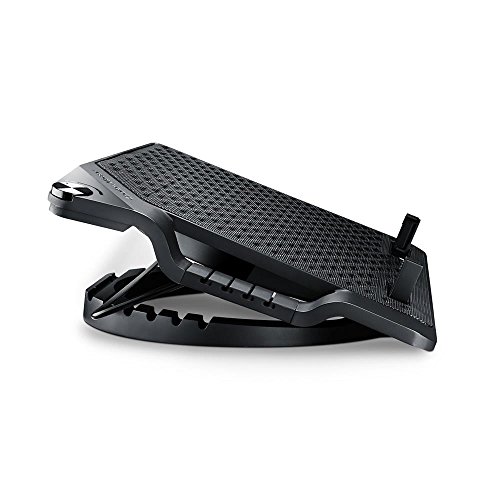

Ergonomic design with RGB lighting: the MNBC Ultra cooling base for laptops up to 18" combines a steel and ABS structure with an adjustable stand with 5 tilt levels; in addition, it has an RGB lighting system around the entire base
Debunking Common Myths About Clamshell Mode
Have you ever wondered about the common myths surrounding clamshell mode? Let’s clarify a few misconceptions about using your MacBook in this setup.
- Heat Concerns: Many believe clamshell mode causes excessive heat. In reality, built-in thermal sensors effectively manage heat, guaranteeing that your laptop operates safely.
- Lid Management: There’s a fear that closing the lid leads to laptop screen damage due to heat. However, there’s no substantial evidence supporting this.
- Performance Degradation: Some users experience increased fan activity, but most don’t face issues like shutdowns or poor performance.
For best results in clamshell mode, make sure you’re using your laptop in well-ventilated areas and avoid covering the keyboard. By following these guidelines, we can safely enjoy the benefits of clamshell mode without worry. High-density foam panels can also help reduce ambient noise in the workspace, improving overall audio clarity and comfort when using an external monitor or speakers sound absorption.
Frequently Asked Questions
Will the Macbook Air Overheat in Clamshell Mode?
No, the MacBook Air typically won’t overheat in clamshell mode. We should guarantee proper ventilation and consider monitoring software options or using external cooling for peace of mind regarding thermal throttling risks and ventilation concerns.
Is It Better to Use a Mac on Battery or Plugged In?
We’ve found it’s better to use our Mac plugged in for performance and battery longevity. Charging myths suggest otherwise, but maintaining power efficiency during demanding tasks proves beneficial, especially when considering our usage habits.
Does Clamshell Mode Improve Performance?
Clamshell mode doesn’t inherently improve performance; however, we might find some performance trade-offs. For multitasking efficiency and gaming capabilities, it can work well with software compatibility, but we should monitor temperatures and battery drain.
Why Is My Mac Overheating While Closed?
Our Mac might overheat while closed due to laptop ventilation issues and sleep mode behavior. Inactive background processes can cause thermal throttling effects, raising temperatures if not properly managed. Let’s monitor those conditions closely.