As an Amazon Associate, we earn from qualifying purchases. Some links on this site are affiliate links at no extra cost to you. Our recommendations are based on thorough research and editorial judgment.


Fan Vs Vapor Chamber Cooling: Why Laptops Spike Under Load

When laptops experience heavy workloads, they generate significant heat, prompting cooling solutions to kick in. Fans are common but can struggle in tight spaces and produce noise. In contrast, vapor chambers provide better heat distribution and are 20-30% more efficient than fans. However, both methods have limitations; fans may cause performance throttling due to overheating. Understanding these methods helps us optimize our laptop usage. We’ll explore further details on maintaining performance and managing heat effectively.
Key Takeaways
- Laptops generate significant heat during demanding tasks, causing potential performance spikes and throttling when temperatures exceed safe limits.
- Fan cooling systems often struggle in compact designs, leading to trapped airflow and inadequate thermal management under high workloads.
- Increased fan speeds used to combat overheating produce distracting noise, impacting user experience during intense gaming or video editing sessions.
- Vapor chambers provide superior thermal distribution, enhancing cooling efficiency by 20-30%, helping to maintain performance without risking overheating.
- Innovative cooling technologies are emerging, promising to improve efficiency and reduce noise, fostering better laptop performance under load.
Understanding Laptop Heat Generation
When we think about laptops, it’s important to recognize how much heat they generate during use. Laptops generate significant heat, especially when using powerful components like CPUs and GPUs for demanding tasks such as gaming or video editing. Even basic activities, like web browsing, can contribute to heat, albeit at a lower level. Excessive heat can lead to performance throttling, causing your laptop to slow down to protect its components.
To maintain ideal temperature, efficient thermal management systems are essential. Ideally, laptops should operate between 40°C and 90°C. Cooling solutions such as fans and heat pipes are vital in managing heat, ensuring components stay within safe limits, and preserving performance during prolonged use. Understanding these factors helps us make better choices for our laptops. Multiple-fan cooling pads can improve heat management by reducing temperatures by around 15–20°C and often operate quietly with levels near 28dB for minimal disturbance.
The Role of Cooling Systems in Laptops

Cooling systems in laptops are essential for maintaining peak performance, especially under heavy workloads. Effective thermal management guarantees that components like CPUs and GPUs don’t overheat, which can lead to thermal throttling, reducing performance.
- Active Cooling: Traditional fans provide active cooling by pulling in air to enhance heat dissipation. However, as workloads intensify, they can become noisy and less efficient.
- Vapor Chamber Technology: This advanced method uses phase change principles for passive cooling, efficiently distributing heat across a larger surface area. These systems can boost cooling efficiency by 20-30% compared to standard heat pipes.
Both cooling systems play critical roles, but we must choose the right type to guarantee effective thermal management and safeguard our laptop’s longevity and performance. Semiconductor stands and thermoelectric designs can offer rapid cooling and dual turbo fans for added airflow in demanding scenarios.
Common Cooling Methods: Fans vs. Vapor Chambers

In today’s laptops, the choice between fan cooling and vapor chamber technology can markedly impact performance and design.
Recommended Products

18” UHD+ 4K 200Hz DISPLAY — Enjoy ultra-sharp 4K quality for creative work and high refresh rates for silky-smooth gameplay, backed by 100% DCI-P3 color accuracy that’s Calman Verified for the most lifelike visual

Processor: 13th Generation Intel Core i9-13980HX Processor (E-cores up to 4.00 GHz P-cores up to 5.60 GHz)

ISV-CERTIFIED MOBILE WORKSTATION – Built for professional software including AutoCAD, SolidWorks, Creo, ANSYS, and MATLAB. ISV certifications and MIL-STD durability ensure reliable performance for engineers, architects, and designers working on complex projects
Fans
- Widely used in laptops for thermal management.
- Draw in cool air while expelling hot air.
- Can generate noise and may struggle during high-load tasks, leading to overheating.
Vapor Chambers
- Utilize a sealed environment for efficient heat transfer.
- Provide superior thermal distribution, especially essential in gaming laptops.
- Offer 20-30% better cooling efficiency, managing heat output from CPUs and GPUs.
- Their thinner, lighter design benefits portable laptops, making them less bulky.
Despite these advantages, vapor chambers are less common due to higher production costs compared to simpler fan and heat pipe setups. Ultimately, both methods have their place in laptop cooling solutions. A good protective accessory like a dust cover made from waterproof Oxford cloth can help keep the cooling intake and exhaust areas free of debris and prolong overall system longevity.
How Fans Operate Under Load

Understanding how fans operate under load is important because they play a key role in keeping our laptops cool during demanding tasks.
- Functionality: Fans draw in cool air and expel hot air, adjusting their speed based on temperature and workload.
- Performance under Load: When we engage powerful CPUs and GPUs, fans may ramp up to maximum speed for effective thermal dissipation.
- Cooling Efficiency: Laptop designs greatly impact airflow. Slim models may struggle with heat management, risking overheating during intense use.
- Noise Levels: As the fans speed up, the noise levels increase, which can be distracting during gaming or processing tasks.
- Maintenance: Dust accumulation can obstruct airflow, so we need to clean fan vents regularly for ideal cooling performance.
- Many users choose compact USB-powered fans for supplemental cooling when laptops run hot.
Recommended Products

Intel Ultra 9 275HX Processor: This Lenovo Legion Pro 7i Gen 10 Gaming Laptop is equipped with the Intel Ultra 9 275HX processor (24 Cores, 36M Cache, up to 5.40 GHz, 24 Total Threads, which provides unprecedented processing power to meet the needs of demanding games, content creation, and multitasking. AI acceleration in select creative applications further boosts performance, enabling faster rendering and smoother workflows

Next-Gen Power with Intel Ultra 9: The Alienware 16 Area-15 Gaming Laptop is Engineered for serious gaming, the latest Intel Ultra 9 275HX processor (24-core, up to 5.4 GHz) delivers lightning-fast responsiveness, superior multitasking, and AI-enhanced performance for smoother gameplay and high-efficiency workloads

New 10th Gen Intel Core i7-10875H Processor: Turbo Boost of 5.1 GHz and up to 64GB RAM for powerful gaming and work performance
Limitations of Fan Cooling Systems

While fan cooling systems are crucial for maintaining laptop temperatures, they come with significant limitations that can affect overall performance.
- Compact Designs: Many laptops trap airflow due to their slim profiles, limiting effective thermal management.
- High Workloads: When processing demands increase, components like CPUs and GPUs often overheat, leading to performance throttling.
- Noise Levels: Under load, fan noise can become distracting as speeds ramp up to manage heat, affecting user experience.
- Localized Overheating: Inconsistent thermal performance can cause certain areas to overheat, risking damage to critical components.
- Sustaining Performance: High-performance laptops may struggle to maintain peak efficiency during extended use due to elevated temperatures leading to system shutdowns or reduced performance.
A targeted cooling pad with ultra-quiet fans can reduce temperatures by 10-15C and help mitigate these issues.
Recommended Products

Smart Cooling - Intelligently adjusts fan speeds based on system temperatures: From idle to full load, keep your laptop running smoothly with our first laptop cooling pad that changes fan speeds automatically to manage system temperatures based on your settings.

Intelligent AI Temperature Control with Myth.cool Software: Safeguard your laptop with our cutting-edge cooling technology! The llano V12 Ultra features three smart cooling modes (Low/Medium/High) that automatically adjust fan speed based on your laptop's workload. Experience efficient cooling with minimal noise—perfect for gaming, working, or streaming. Download the software from "llanolife.com/Download" for seamless control, or opt for manual operation with a simple scroller.

Ergonomic design with RGB lighting: the MNBC Ultra cooling base for laptops up to 18" combines a steel and ABS structure with an adjustable stand with 5 tilt levels; in addition, it has an RGB lighting system around the entire base
Introduction to Vapor Chamber Technology
Vapor chamber technology offers a remarkable advancement in laptop cooling solutions, particularly for high-performance devices. This innovative method utilizes a sealed vessel filled with liquid, usually water, to enhance heat transfer.
Key features of vapor chamber technology include:
- Efficient Heat Dissipation: It uses evaporation and condensation to effectively dissipate heat from crucial components, like the CPU and GPU.
- Superior Thermal Management: The materials used allow for even thermal distribution, preventing hot spots that can impair performance.
- Improved Cooling Efficiency: Research shows it enhances cooling efficiency by 20-30% compared to traditional heat pipes.
As high-performance laptops become more demanding, the adoption of vapor chamber technology is essential to maintain ideal conditions during intense usage, ensuring reliable performance. Studies also indicate that combined with effective heatsinks, vapor chambers can reduce component temperatures by 5C to 20C, improving longevity and sustained performance.
Benefits of Vapor Chamber Cooling for Performance
When it comes to enhancing laptop performance, the benefits of vapor chamber cooling technology are significant and worth noting. This advanced cooling solution offers various advantages:
- Efficient Thermal Management: Vapor chamber cooling guarantees even temperature distribution, minimizing localized overheating of CPUs or GPUs.
- Enhanced Cooling Efficiency: Compared to traditional thermal pipes, it improves cooling efficiency by 20-30%, vital for high-performance laptops during demanding tasks.
- Effective Heat Load Management: With a thermal resistance as low as 0.05 K/W, it efficiently handles substantial heat loads, aiding in overheating prevention.
- Compact Design: Its slim profile allows for lighter laptop designs, meeting the needs of users seeking portability without sacrificing performance.
A compact design also supports portable power solutions for users who need reliable energy on the go.
Comparing Cooling Efficiency: Fans vs. Vapor Chambers
Cooling efficiency in laptops is essential for maintaining ideal performance during demanding tasks, and understanding the differences between fans and vapor chambers helps us make informed choices.
- Fans:
- Rely on airflow to dissipate heat from components.
- Cost-effective and easy to implement.
- May struggle with effective thermal management during intense gaming, leading to thermal throttling.
- Vapor Chambers:
- Utilize phase change principles for superior cooling.
- Enhance efficiency by 20-30% compared to heat pipes.
- Silent operation minimizes thermal resistance, ideal for high-performance laptops.
- Higher production costs make them less common in standard laptops.
Ultimately, both systems have pros and cons, but vapor chambers excel in cooling efficiency for powerful CPUs and GPUs when workloads are heavy. Many high-end laptop designs also combine these systems with advanced materials like graphene to further improve heat dissipation and structural strength.
Recommended Products

ISV-CERTIFIED MOBILE WORKSTATION – Built for professional software including AutoCAD, SolidWorks, Creo, ANSYS, and MATLAB. ISV certifications and MIL-STD durability ensure reliable performance for engineers, architects, and designers working on complex projects

FAST 16” OLED QHD+ 240Hz DISPLAY — Truly designed for the competitive gamer with 0.2 ms response time, featuring a VESA ClearMR 11000 rating and DisplayHDR 500 certified to ensure minimal blurring and vivid colors (1M:1 contrast ration and 100% DCI-P3)

Intel Ultra 9 275HX Processor: Powering the ROG Strix G18 is the Intel Ultra 9 275HX processor, boasting 24 cores (8 Performance + 16 Efficient) and a base clock of 2.7 GHz, boosting up to 5.4 GHz. This next-gen CPU excels in gaming and creative tasks with AI acceleration for faster rendering, offering unbeatable speed and performance, whether you're gaming, streaming, or editing
Impact of Workload on Thermal Management
Understanding how workload affects thermal management is essential for laptop users. High-performance tasks like gaming and 3D rendering generate significant heat, requiring effective heat management solutions.
- Cooling Solutions: Enhanced cooling mechanisms, such as heat pipes and vapor chambers, are fundamental in preventing overheating.
- Temperature Regulation: As CPU usage increases during multitasking, temperature regulation becomes crucial to maintain consistent performance.
- Improved Thermal Performance: Vapor chambers can improve thermal efficiency by 20-30% compared to standard heat pipes.
For high-performance laptops designed for demanding applications, investing in robust thermal systems is important. They help distribute heat evenly, thereby reducing the risk of localized overheating and extending the lifespan of internal components. Prioritizing effective cooling solutions will ultimately enhance your laptop’s performance. A well-designed mount with anti-twist design can also help stabilize attached cooling accessories and protect equipment during mobile setups.
Addressing Noise Levels in Laptop Cooling
Many laptop users are familiar with the noise generated by fan-based cooling systems, especially during high-performance tasks. As we push our laptops, particularly those designed for gaming, the heat generated by powerful CPUs and GPUs can lead to significant increases in fan noise.
Addressing Fan Noise
- Performance Settings: Opting for “Better Battery” can reduce noise levels compared to “Better Performance.”
- Power Management: The Nvidia Control Panel offers settings like “Adaptive,” regulating GPU output to help lessen fan noise.
- Cooling Methods: Traditional dual-fan systems often struggle, leading to continuous operation and elevated noise levels.
Innovations like vapor chambers show promise. By efficiently dissipating heat with pipes and vapor chambers, they could lower fan noise levels during high-performance activities, helping maintain performance while ensuring a quieter experience. A compact USB desk fan can also provide localized airflow to improve perceived cooling and reduce reliance on internal fans personal comfort.
The Future of Cooling Technology in Laptops
As the demands on laptops increase, designers are exploring innovative methods to enhance cooling efficiency. One emerging technology is the vapor chamber, which offers superior thermal management. By improving heat transfer, these devices can boost cooling efficiency by 20-30%, ideal for high-performance tasks.
- Compact Design: Vapor chambers can be as thin as 0.4 mm, making them suitable for sleek laptops.
- Advanced Cooling Integration: Future solutions may combine vapor chambers with advanced pump technologies, minimizing fan noise and increasing thermal dissipation.
- Market Growth: We’re witnessing a significant rise in vapor chamber use, particularly in AI-driven devices, with a projected market value of USD 1400 million by 2033.
Embracing these advancements can greatly enhance laptop performance while keeping devices cooler.
Recommendations for Optimal Laptop Usage
To maximize our laptop’s performance and longevity, we need to adopt some practical habits that enhance cooling and efficiency. Here are some recommendations:
- Use Hard Surfaces: Always place laptops on hard, flat surfaces to guarantee proper airflow, preventing overheating.
- Cooling Pads: For demanding tasks like gaming or video editing, utilize cooling pads to boost airflow and maintain ideal temperatures.
- Regular Maintenance: Clean laptop vents and fans regularly to remove dust buildup, improving cooling efficiency and reducing thermal throttling.
- Temperature Monitoring: Use software tools to monitor CPU and GPU temperatures, allowing us to identify heat spikes and make adjustments.
- Thermal Paste: For older laptops, consider applying high-quality thermal paste to improve heat transfer and overall thermal management.
Recommended Products

Designed with reservoir for Bitspower Dual/ single D5 top
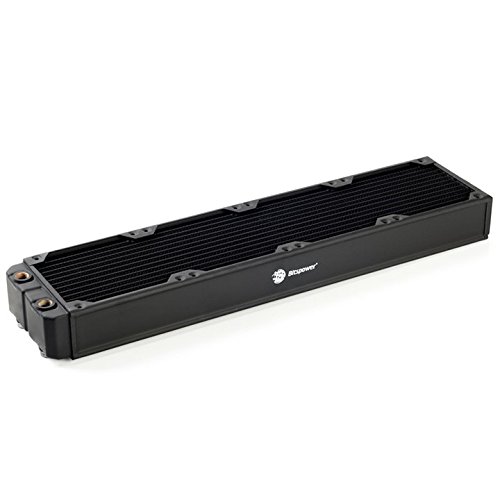
Designed with reservoir for Bitspower Dual/ single D5 top

TOUGHLIQUID 240 ARGB features a rotational cap that allows users to rotate the cap easily even after installation, so the TT logo faces the right direction to present the overall aesthetic of the build.
Frequently Asked Questions
What Are the Disadvantages of Vapor Chambers?
Vapor chambers have disadvantages like cost implications, design complexity, and weight considerations. We also face durability issues, maintenance requirements, and vapor efficiency concerns, which affect performance consistency and heat dissipation limits in various applications.
Are Cooling Fans Effective for Laptops?
Cooling fans are effective for laptops, but they can struggle with overheating under load. Balancing airflow design, noise levels, and energy efficiency is essential for ideal thermal management and component lifespan.
Is Vapor Chamber Cooling Effective?
We believe vapor chamber cooling’s efficiency surpasses traditional methods, offering superior thermal conductivity and heat dissipation. This compact design enhances laptop gaming performance, showcasing material science innovation while considering environmental impacts for sustainable cooling solutions.
Do Laptops Use Vapor Chambers?
Yes, many laptops use vapor chamber technology. These advanced laptop cooling solutions enhance thermal management systems through efficient heat transfer, optimizing performance in gaming laptops and offering superior thermal conductivity compared to traditional cooling methods.