As an Amazon Associate, we earn from qualifying purchases. Some links on this site are affiliate links at no extra cost to you. Our recommendations are based on thorough research and editorial judgment.


Network Over Usb‑C: When to Use 1G Vs 2.5g

When setting up a USB-C network, we should consider the speed requirements. For standard use, 1G Ethernet (up to 1 Gbps) is usually sufficient. However, if we have multiple devices or perform heavy tasks, 2.5G Ethernet (up to 2.5 Gbps) is ideal for faster data transfers and future-proofing. It supports modern devices better. Evaluating our needs helps determine the best choice. Let’s explore why one option might fit better than the other.
Key Takeaways
- Use 1G Ethernet for basic online activities and to avoid upgrading costs for older devices.
- Opt for 2.5G Ethernet if you need faster speeds for large file transfers and multiple device connections.
- Modern devices like SATA SSDs and gaming consoles benefit significantly from 2.5G for reduced latency and enhanced performance.
- Consider long-term value; 2.5G future-proofs networks for increasing data demands as the price gap narrows.
- Ensure compatibility with quality Ethernet cables (Cat 5E or Cat 6) to optimize network performance at higher speeds.
Understanding 1G and 2.5G Network Speeds
When we consider network speeds, understanding the differences between 1G and 2.5G Ethernet is essential.
- 1G Ethernet:
- Offers connection speeds up to 1 Gbps.
- Suitable for standard internet usage.
- Can limit performance during high-bandwidth tasks.
- 2.5G Ethernet:
- Provides maximum speeds of 2.5 Gbps.
- Ideal for heavy data transfers and multiple device use.
- Enhances performance, especially for large files and data-intensive activities.
While most average users might find 1G sufficient, businesses and power users should consider 2.5G for future-proofing their network. Real-world conditions can show saturation on a 2.5G connection, but it still considerably outperforms 1G, allowing for smoother operation in demanding environments. A growing number of modern networking devices support multi-gig Ethernet which helps take advantage of higher-speed connections.
Advantages of 2.5G Connections

2.5G connections bring a host of advantages that enhance our networking experience. Here’s why we should consider them:
- Speed: They can reach up to 2.5Gbps—much faster than the 1G standard—allowing swift data transfers and reduced latency.
- Future-proofing: With 2.5G, we’re ready for upcoming high-speed internet services, ensuring compatibility with advanced devices.
- Network capacity: More devices can connect simultaneously without slowdowns, which is ideal for households with many high-demand gadgets.
- Enhanced performance: For tasks like large file transfers, gaming, and streaming, the additional bandwidth is essential.
- Network efficiency: It maximizes the benefits of high-speed devices, including modern SATA SSDs, making our connections more effective.
Choosing 2.5G over 5G connections could be our best investment. Rapid adoption is supported by compatible hardware and positive user reviews, which often highlight improved battery life, charging efficiency, and reliability.
Real-World Performance Comparisons

How do real-world performance comparisons between 1G and 2.5G connections impact our daily experiences? The difference is clear when we use a compatible network adapter. Here’s what we find:
- Speed: 1G connections max out at 1Gbps, while 2.5G can reach 2.5Gbps. That’s over double the performance.
- Data Transfer: Devices on 2.5G ports show noticeably faster transfers, especially useful for large files or high-definition streaming.
- Network Saturation: Under heavy use, 2.5G’s efficiency might drop as multiple devices compete for bandwidth.
- Real-World Factors: Users with advanced devices like modern SATA SSDs notice improved speeds, aiding tasks like data backup.
- Multi-port USB-C chargers and hubs often provide convenient power and connectivity while supporting multiple devices, improving setup flexibility and reducing cable clutter when using network adapters with multi-port chargers.
When to Choose 1G for Your Network

For many users, sticking with a 1G network can be the practical choice, especially when daily activities don’t demand ultra-fast speeds. Here are some reasons to evaluate this option:
- Sufficient Speeds: A 1G Ethernet Adapter supports speeds up to 1Gbps, handling browsing, streaming, and light gaming well.
- Cost-Effective: Choosing 1G avoids the expenses associated with upgrading to 2.5G infrastructure, making it a budget-friendly decision.
- Compatibility: Many older devices, like basic routers and computers, natively support 1G connections, eliminating the need for new equipment.
- Simultaneous Usage: A 1G network can support several standard online activities at once, as long as the number of connected devices remains manageable.
Ultimately, if your network needs are modest, 1G is a solid choice. Many affordable switches also include energy-efficient designs that help lower operational costs.
Recommended Products

Intel Core i9 with 8 Performance Cores, 8 Efficient Cores, and 24 threads processor with 64GB DDR4 RAM
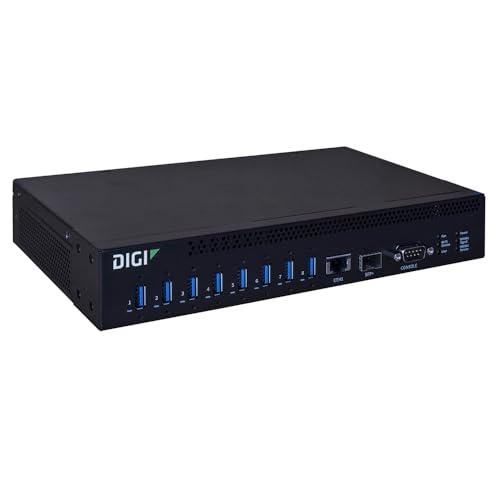
Cellular Support: Equipped with a Digi CORE plug-in LTE modem compliant socket, enabling optional cellular connectivity for enhanced flexibility.

AMD Ryzen AI 9 HX 470 & 86TOPS AI Power — Private Offline AI Mini PC Powered by the advanced 4nm Zen5 hybrid architecture, this AI mini PC features the flagship Ryzen AI 9 HX 470 (12C/24T). With a dedicated NPU delivering 55TOPS standalone AI power and up to 86TOPS full-system performance, it supports complete offline local AI computing. Run large language models, generate AI art, and enhance AI video with zero latency, no data leaks, and full privacy for creators, developers, and tech enthusiasts.
Benefits of Upgrading to 2.5G

When considering an upgrade for our network, moving to 2.5G can greatly enhance our internet experience. Here are the key benefits:
- Speed: With speeds up to 2.5Gbps, we’re getting more than double the capacity of a 1G connection.
- Network Capacity: The 2.5G port supports simultaneous connections for multiple devices, ideal for high-demand environments.
- File Transfers: Compatibility with modern hardware, like SATA SSDs, reduces bottlenecks and improves large file transfers.
- Future-Proofing: Investing in a 2.5G Ethernet Adapter guarantees our network can handle increasing bandwidth needs in the coming years.
- Efficiency: A 2.5G switch maximizes output for gaming, streaming, and large downloads, keeping our tasks running smoothly.
Upgrading to 2.5G makes sense for our network’s growth. A robust choice is to pair it with high-quality gear featuring noise cancellation to keep audio and networked media crisp.
Recommended Products

THUNDERBOLT 3 TO ETHERNET ADAPTER: Thunderbolt Ethernet Adapter adds one multi-Gigabit RJ45 port to a Thunderbolt 3/4 enabled computer enabling connection to 1G, 2.5G, 5G, and 10G networks

【Blazing 10Gbps Speed】Our USB C to ethernet adapter supports 10Gbps Gigabit transmission, efficiently empowering professional scenarios. It with ultra-low latency from Intel and Aquantia chips. The USB to ethernet adapter can complete the transmission of 4K/8K high-definition videos, RAW format photos, large engineering files.
![Cable Matters [Intel Certified] Thunderbolt 3 10G Ethernet Adapter (Thunderbolt 3 10GbE Ethernet Adapter) with NBASE-T Support](https://m.media-amazon.com/images/I/41ikQq7BvKL._SL500_.jpg)
10x more speed with this Thunderbolt 3 to Ethernet Adapter that delivers lightning fast speed over a 40 Gbps Thunderbolt 3 port; Check your computer 40 Gbps or 20 Gbps Thunderbolt 3 port; Some computers have Thunderbolt 3 ports wired for 20 Gbps or 40 Gbps or a combination of both
Potential Bottlenecks With 1G
While 2.5G offers a significant upgrade for our network, relying on 1G connections can lead to several performance issues. Here are some potential bottlenecks with 1G:
- Limited Throughput: A 1G port caps at 1Gbps, which can bottleneck high-speed SSDs during large file transfers.
- Saturation Risks: In environments with multiple devices, high bandwidth demand can cause the 1G connection to slow down, leading to latency issues.
- Future-Proofing Concerns: Sticking with 1G limits our potential as internet speeds and device capabilities continue to rise.
- Performance Drops in High Demand: When multiple users stream or upload data, the 1G network interface may struggle to maintain consistent speeds.
In contrast, using a 2.5G connection mitigates these risks effectively. Choosing adapters and hardware that support dual HDMI and modern USB standards can help ensure your setup remains capable and portable.
Types of Devices That Benefit From 2.5g
Understanding the types of devices that can truly benefit from a 2.5G connection is essential for optimizing our network performance. Below are key examples:
- Modern SATA SSDs: These require higher bandwidth for efficient data transfer, especially during large file operations.
- Gaming Consoles and PCs: They can leverage 2.5G to reduce latency and enhance download speeds, improving the multiplayer gaming experience.
- Content Creation Devices: Video editing workstations benefit greatly, as faster uploads and downloads of large media files boost workflow efficiency.
- Network-Attached Storage (NAS): Systems like TrueNAS with 2.5G NICs support multiple users accessing large files simultaneously without bottlenecks.
- USB-C Laptops: Recent models like MacBook and Dell XPS can use Ethernet adapters to enhance wired internet performance over traditional 1G connections.
Many USB-C adapters offer plug-and-play functionality, making it easy to add 2.5G networking without complex driver setups.
Recommended Products

[High Performance] Mini PC equipped with AMD Ryzen 7 7840HS, 8 cores 16 threads, 16M smart L3 Cache, base frequency: 3.8GHz, max 5.1GHz. The process rule has improved from the previous generation of 7nm to 4nm, with "Zen 4" architecture, Pre-installed with Windows 11 Pro (64bit) OS, the computer can handle heavy computing tasks smoothly and better for multitasking. Built-in WiFi6E, Bluetooth 5.3. Mini PC is ideal for such as Programming, Design, Office, Education, Gaming, etc.

✔【Processor & Local AI Engine】Reatan X8 AI Mini PC, powered by AMD Ryzen AI 9 HX 470 (12 cores / 24 threads, up to 5.2GHz, 86 AI TOPS), featuring integrated AMD Radeon 890M graphics. With its built-in NPU (Neural Processing Unit), it can run large language models, AI assistants, and Windows Copilot directly on the device. Achieve ultra-low latency, powerful local AI processing without the cloud. Ideal for AI content creation, data analysis, programming, and light-to-medium gaming at high graphics settings. Built on TSMC's 4nm process for exceptional power efficiency.

【Ultimate AI Workstation & Hardcore Gaming Monster】The Reatan X8 unleashes the full potential of the AMD Ryzen AI 9 470 processor, built on the revolutionary Gorgon Point architecture. As a next-generation ai pc, it harnesses 12 cores, 24 threads (up to 5.2GHz) and an advanced RDNA 3 NPU to deliver an astounding 86 total TOPS (55 NPU TOPS) of localized processing power. This ryzen ai 470 mini pc lets you run complex local LLMs, compile dense code, or generate AI imagery natively—completely independent of the cloud, with absolute data privacy and zero hidden costs.
Cost Considerations for Upgrading
Upgrading to a 2.5G network setup presents both costs and benefits that we should carefully evaluate. Here are some key cost considerations:
- Initial Investment: Shifting involves purchasing compatible hardware like 2.5G switches and Network Interface Cards (NICs), increasing initial costs compared to a 1G-only setup.
- Long-Term Value: While 1G suffices for basic needs, 2.5G future-proofs our network for higher data demands, making it cost-effective for bandwidth-heavy tasks over time.
- Narrowing Price Gap: The price difference between 1G and 2.5G components has reduced, allowing upgrades without a significant financial burden.
- Total Cost of Ownership: We should factor in potential network upgrades as data demands increase, making 2.5G an attractive choice.
- Improved Performance: Upgrades can lead to increased efficiency and savings by reducing downtime in mixed-device environments.
A good compromise for many setups is choosing devices that support both 1G and 2.5G ports to balance cost and future needs.
Recommended Products

24 x 1G/2.5G/5G/10G Multi-gig Ethernet Ports

2.5G MULTI-GIG ETHERNET PORTS: Features 24 x 2.5Gbps Multi-Gig Ethernet ports for high-speed connectivity. Auto-negotiating ports detect the optimal speed for connected devices and work with existing Cat5e or Cat6 Ethernet cables.

SWITCH PORTS: 16 ports 10/100/1000 + 8 ports 2.5GE + 4x 10GE SFP+ (total PoE power budget: 375W, PoE, PoE+)
Configuring Your Network for Optimal Performance
With a 2.5G network in place, fine-tuning our configuration can profoundly enhance performance. Here are key details we need to know:
- Evaluate Bandwidth: Assess the total bandwidth needs based on connected devices. Prioritize 2.5G for high-demand users like gamers or large file transfers.
- Disable 1G NICs: If all devices connect through the 2.5G switch, disabling 1G network interface cards helps eliminate bottlenecks.
- Static IPs: Implement static IP settings for consistent device identification, aiding in management and connectivity.
- Cabling: Confirm we’re using compatible Ethernet cables (Cat 5E or Cat 6) and a modem/router that supports multi-Gigabit speeds to fully take advantage of our setup.
- Consider portable and durable hardware options like metal mesh stands to maintain a tidy, reliable workspace that supports your network equipment.
Recommended Products
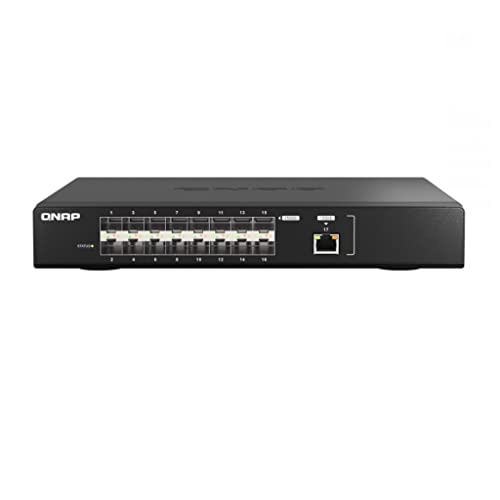
Offers 16-port 25GbE SFP28 fiber ports and a backbone switching capacity of 820Gbps for uplinking server rooms
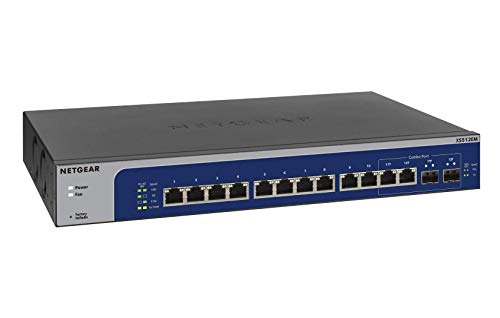
12 x 1G/2.5G/5G/10G Multi-gig Ethernet Ports

Troubleshooting Common Issues
When dealing with connection issues on USB-C Ethernet adapters, it’s vital to know some common troubleshooting steps that can help us get back on track.
- Check Ethernet Service Settings: Guarantee they’re configured correctly; this often resolves connection failures.
- Assess Mac Model Performance: Newer models, like the Mac Mini M2 Pro, may show slower speeds compared to older devices.
- Use Terminal Commands: Commands like `ifconfig` and `netstat` can reveal actual link speeds and error counts, pointing to cabling or device problems.
- Identify Software Conflicts: Look out for third-party speed enhancers or cleaners that may interfere with Ethernet performance.
- Also consider verifying that any installed cleaning tools or drivers for adapter maintenance are correct and up to date to avoid unexpected issues.
Future-Proofing Your Network Setup
As we’ve explored troubleshooting connection issues with USB-C Ethernet adapters, it’s clear that a robust network setup is essential for a seamless online experience. To future-proof our network setup, we should invest in 2.5G technology. Here’s why:
- Increased Bandwidth: 2.5G ports support greater bandwidth, accommodating upcoming high-speed internet services and devices.
- Multi-Device Efficiency: They enhance capacity for multiple connected devices, making data-heavy tasks like large file transfers efficient over a Local Area Network (LAN).
- Higher Throughput: Compared to 1G, 2.5G connections offer considerably higher speeds, especially with modern devices like SATA SSDs.
- Network Scalability: As demands grow, relying on 1G could lead to bottlenecks, limiting our network performance.
Frequently Asked Questions
Should I Use 2.5g or 1G Ethernet?
We’d recommend using 2.5G Ethernet for better performance. Its superior speed and capacity handle more traffic effectively, enhancing our experience, especially for high-demand tasks. Let’s invest in the future with 2.5G technology now!
Is 1GB Enough for a Home Network?
In our digital garden, 1GB can sprout adequately for average home usage, yet as our networked flora blooms—think streaming and gaming—this bandwidth might stifle growth. Upgrading guarantees we’ve room to thrive in the future.
Can USB-C Handle Gigabit Ethernet?
Yes, USB-C can handle Gigabit Ethernet. With the right adapters, we can take advantage of USB C capabilities for high-speed connections, ensuring our devices enjoy fast and reliable internet access without built-in Ethernet ports.
Is 2.5 Gbps Broadband Worth It?
Yes, we believe 2.5 Gbps broadband is worth it. The cost efficiency of faster speeds for multiple devices means smoother streaming and gaming experiences, ultimately enhancing our overall internet satisfaction and future-proofing our network investment.


